Company owners & finance teams
See where a reporting file stands and give your accountants a clearer path from source numbers to review.

SIGMA XBRL / FINANCIAL PREPARATION IN KUWAIT
SIGMA XBRL helps companies, accountants and audit offices in Kuwait prepare financial data for Qayd. Import your trial balance from Excel or CSV, review the statement lines and validation issues, then generate the official-format XLSM workbook for professional review before submission through Qayd.
From source figures to a reviewable workbook
Process illustration; not a product screenshot
A CLEAR PATH THROUGH PREPARATION
The accounting judgment stays with your team. SIGMA XBRL gives that work a clear sequence and a place to resolve issues before the output is produced.
Import the SIGMA Excel template or a trial balance in Excel or CSV, then prepare the financial information for the reporting period.
SOURCE / EXCEL · CSVInspect the financial lines and validation messages. Correct missing information or inconsistencies while the source is still visible.
REVIEW / VALIDATIONProduce the official-format XLSM workbook for a final professional review. Your team handles any submission through the official channel.
OUTPUT / XLSMINSIDE THE PRODUCT
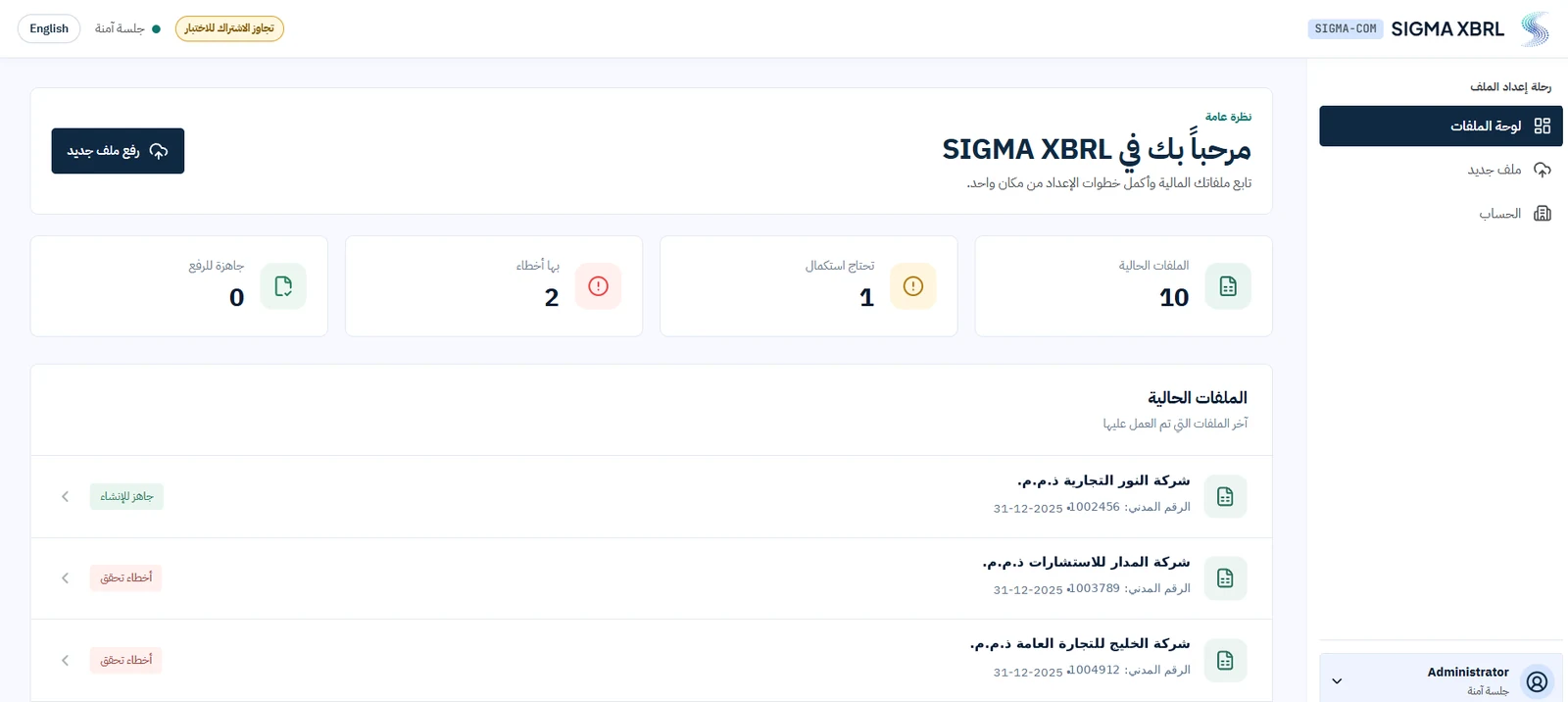
The dashboard brings file progress and validation status together. Open a file to continue preparation; generate the workbook after reviewing the outstanding items.
WHO IT HELPS
See where a reporting file stands and give your accountants a clearer path from source numbers to review.
Prepare statement lines from trial balance data, investigate validation messages, and keep the source figures in view.
Keep client preparation work organized, with a visible status for each file before final review.
SAAS PACKAGES
Package inclusions are being finalized. The preparation features below reflect the current workflow; AI assistance is planned for a future release.
For company teams and accountants
For teams planning assisted preparation
AI assistance is not yet available.
For finance teams and accounting offices
ILLUSTRATIVE EXAMPLE
A fictional company has the following statement of financial position. Amounts are in KWD; this illustrates one check, not a customer result or a complete filing.
The statement balances because 157,000 = 40,000 + 117,000. If equity were imported as 115,000, the difference would be 2,000. Review the source balances, account mappings and period before correcting it; a balancing number alone does not explain the error.
| Statement item | Amount (KWD) |
|---|---|
| Total assets | 157,000 |
| Total liabilities | 40,000 |
| Total equity | 117,000 |
| Assets − liabilities − equity | 0 |
QUESTIONS BEFORE YOU START
It organizes financial data, shows validation issues and generates an XLSM workbook in the official format. Your team reviews the output before using the official Qayd submission workflow.
Yes. Import a trial balance or the SIGMA Excel template, map the accounts to statement lines and review the figures. A trial balance is a starting point; comparative figures, opening balances and disclosures may still need preparation.
You can use exported Excel or CSV figures from your existing accounting workflow. A direct connector is not required for file import. Contact us to confirm the format of your export.
No. SIGMA XBRL supports preparation and workbook generation. Your authorized team handles submission through Qayd; the official portal determines the requirements and final acceptance.
No. Validation helps identify missing or inconsistent information. Your accountant or auditor still reviews classifications, source figures, disclosures and professional judgments.
The dashboard shows multiple files and their progress. Each file is prepared and reviewed separately. Contact us to confirm the package and scope for your office.
AI assistance is upcoming and is not part of the currently advertised workflow. The current workflow covers data import, review, validation and XLSM workbook generation.
Articles in Arabic
NEXT STEP
Tell us how you currently prepare financial statements. We’ll walk you through the relevant SIGMA XBRL workflow and answer your questions.
Explore the XBRL Knowledge HubREQUEST A DEMO
Tell us about your reporting files and how you prepare them today. We’ll arrange a focused SIGMA XBRL demonstration.
SIGMA XBRL supports preparation. Filing requirements and final acceptance are determined by the relevant official channel.